Overview
What is the Appian AppMarket?
The Appian AppMarket is a marketplace where Appian and its partners display a diverse range of business solutions and technical applications or extensions that have been built on Appian’s platform.
What can I find on the AppMarket?
In general, you’ll find two categories of apps on the AppMarket:
1. Technical apps that extend or enhance the Appian product’s functionality through reusable extensions, templates or utility applications. Within this category you can find:
a. Plug-in (Component). An Appian product extension that can bring the power of other systems right into the Appian interface via a UI component.
b. Plug-in (Connected System). An Appian product extension that makes it easy to integrate with enterprise systems and services.
c. Plug-in (Function & Smart Service). An Appian product extension to add custom functions to use in expressions or custom smart services to use in process models.
d. Utility. Tools to facilitate efficient Appian development and implementations or horizontally expand end-user capabilities.
2. Line of Business apps that showcase the power of Appian to address a specific vertical or horizontal business problem.Within this category you can find:
a. Solution by Appian. Packaged applications built by Appian that address a business use case in a repeatable manner while still allowing for customer-specific requirements and configurations.
b. Solution by Partner. Packaged applications built by Appian Partners that address a business use case in a repeatable manner while still allowing for customer-specific requirements and configurations.
How do I find an app on the AppMarket?
Search using key terms in the Community search bar or use the filters to find what you are looking for. Have a question or can’t find what you’re looking for? Email appmarket@appian.com.
App Information
What does Compatible Version(s) mean? Will this app be supported in a more recently released Appian platform version than the version listed?
Compatible Version(s) are the version(s) of the Appian platform on which the author has verified they’ve tested an app or plug-in with when submitting to the AppMarket. With a new platform version released four times per year, Appian strives to make backwards compatibility a breeze. In general, plug-ins should work in all Appian versions newer than the minimum version listed. Remember that free, downloadable apps are provided as-is and on a use-at-your-own-risk basis, and their functionality is not guaranteed by Appian.
What about pricing?
Apps are classified as either Free or Paid. Many of the apps on the AppMarket are free to use with a licensed product and are available to download for Appian customers and partners.
The cost of apps designated as Paid varies depending on the app and the author. More information on the cost model for these apps can be obtained from the author by making a Schedule Demo request. The AppMarket team will connect you with the author for follow-up.
How are Free Apps supported?
Free, downloadable apps are Community-supported and should be tested thoroughly. Free, downloadable apps are provided as-is and on a use-at-your-own-risk basis, and their functionality is not guaranteed by Appian. The content is free to use with a licensed product, but it is made available as-is. Customers are responsible for validating and testing plug-ins before deployment in production, as well as validating plug-in functionality in their applications before upgrading to new versions of Appian Software.
Free apps designated with Cost = Free - Appian Supported are supported by Appian. Questions, issues, and enhancement requests related to its use should be directed to Appian Technical Support.
Submitting an App
How do I submit an app to the AppMarket?
Free and paid apps of all types can be submitted through the AppMarket Submissions site. The submission process will guide you through the required content for submission. In most cases the description, screenshots, app icon and appropriate technical files are needed. New versions of existing apps can also be submitted through the site.
How do I submit a private app to the AppMarket?
Private submissions, only available to the author’s organization and not publicly listed on the Appian AppMarket, can be initiated through the AppMarket Submissions site. The AppMarket Submissions process allows you to submit a review for both private and public listings. Unlike public submissions, private submissions do not require marketing collateral materials, such as screenshots or app icons. Additionally, the submission site accommodates the submission of new versions for existing listings. We encourage all app authors to make public submissions when possible in order to benefit the entire Appian Community. Private submissions require justification and are best used when the app or plug-in contains sensitive proprietary technical functionality.
What does the review process entail and how long does it take?
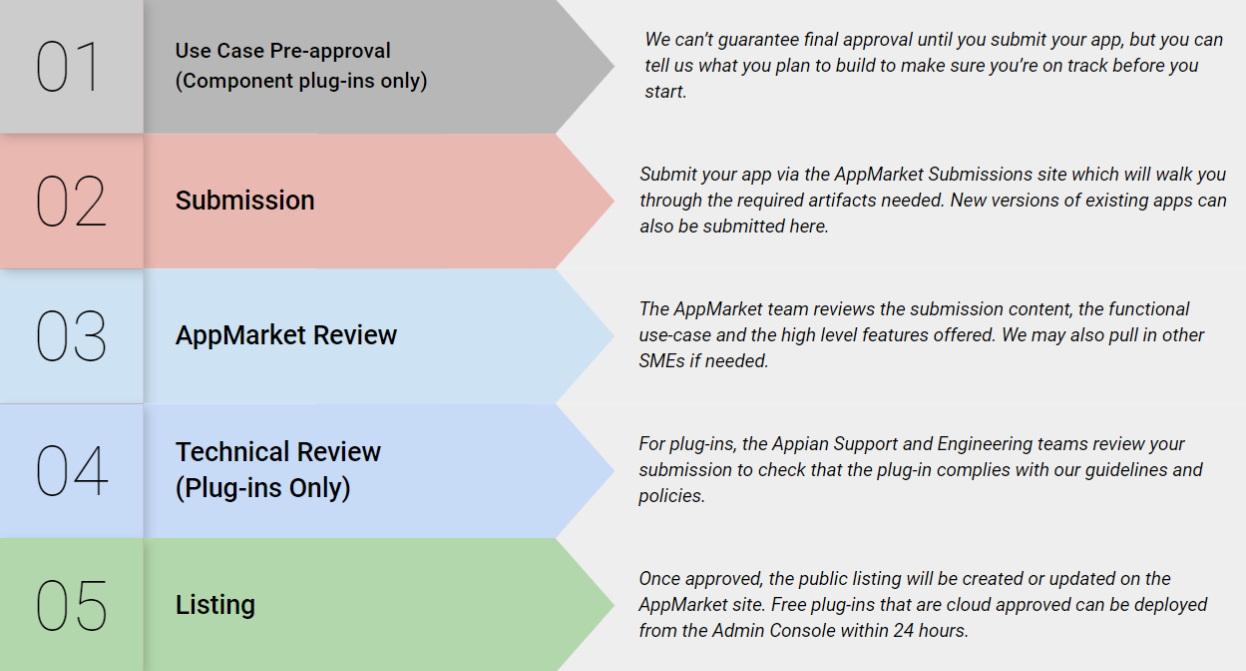
The diagram below summarizes the review process for AppMarket submissions. Most submissions are reviewed and listed within 10 business days assuming there are no revisions needed. Please note that the process may take longer in certain cases depending on the specific submission. For plug-ins, the policies are described in the section below and please review our documentation for component plug-in specifics.
How can I submit an RPA Utility?
Appian RPA utilities can be submitted in one of two formats:
- Packaged as a library.
- Packaged as a single robotic process if it is included as part of a larger automation or application. The submission must include the companion application.
AppMarket Artwork Guidelines for App Icons and Screenshots
What are the guidelines for App Icons?
When submitting an application or solution to the Appian AppMarket, including an icon is mandatory. The app icon serves as a visual representation of the listing and provides additional information about it. It’s a necessary element that makes your app stand out to users navigating through the AppMarket.
Icon image specifications:
- Design your icon as a full-bleed square image. On most platforms, the system applies a mask that automatically adjusts icon corners to match the platform’s aesthetic. Any text or imagery outside the safe zone will be cut off.
- Artwork should be 180 × 180 pixels at 72ppi
- The file should be .jpg or .png
- Color space: sRGB
- Max file size: 1024KB
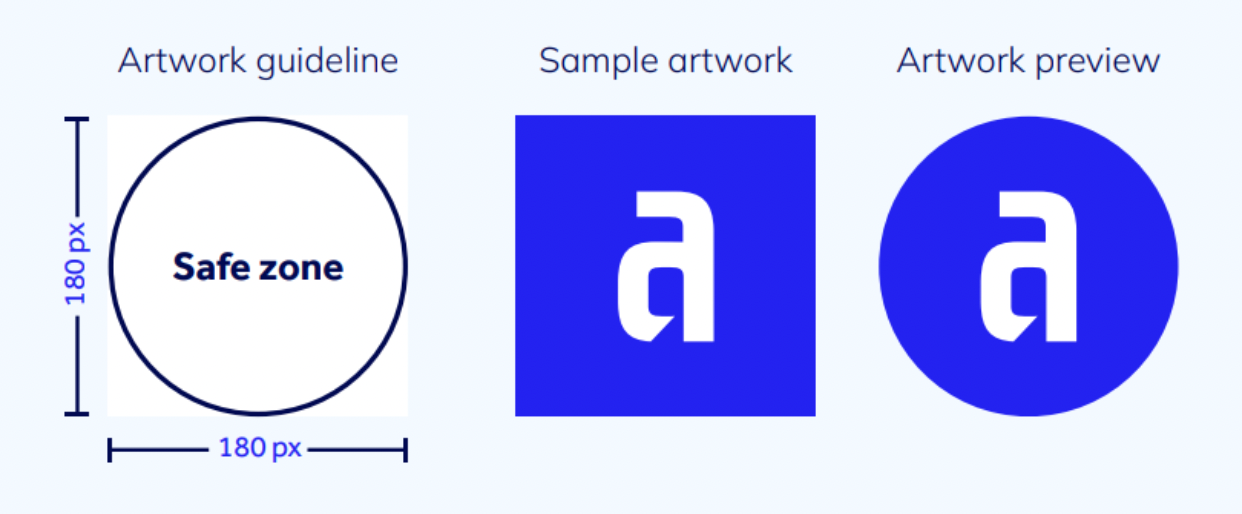
For additional guidance, please view our AppMarket Artwork Guidelines.
What are the best practices for App Icons?
- Embrace simplicity—simple icons tend to be easier for people to understand and recognize.
- Create a design that works well on multiple platforms so that it feels at home on each.
- Include text only when it’s an essential part of your experience or brand.
- Use graphical images or photos and avoid replicating UI components in your icon.
- Consider a distinct color from the current AppMarket background color (white). Pick a background color for your asset that’s appropriate for your brand and doesn’t include any transparency.
- Don’t use text or graphic elements that can mislead users, indicate ranking or promote deals, or incentivize installs.
- If there is no distinct color or shape around a logo defining it, place it on a full bleed background.
- If your artwork is flexible enough, consider tweaking it to fully utilize the asset size.
- Don’t use replicas of Appian software products. Appian products are copyrighted and can’t be reproduced in your app icons.
What are the guidelines for screenshots?
Adding compelling screenshots will grab attention to your listing! Your app’s first impression matters most.
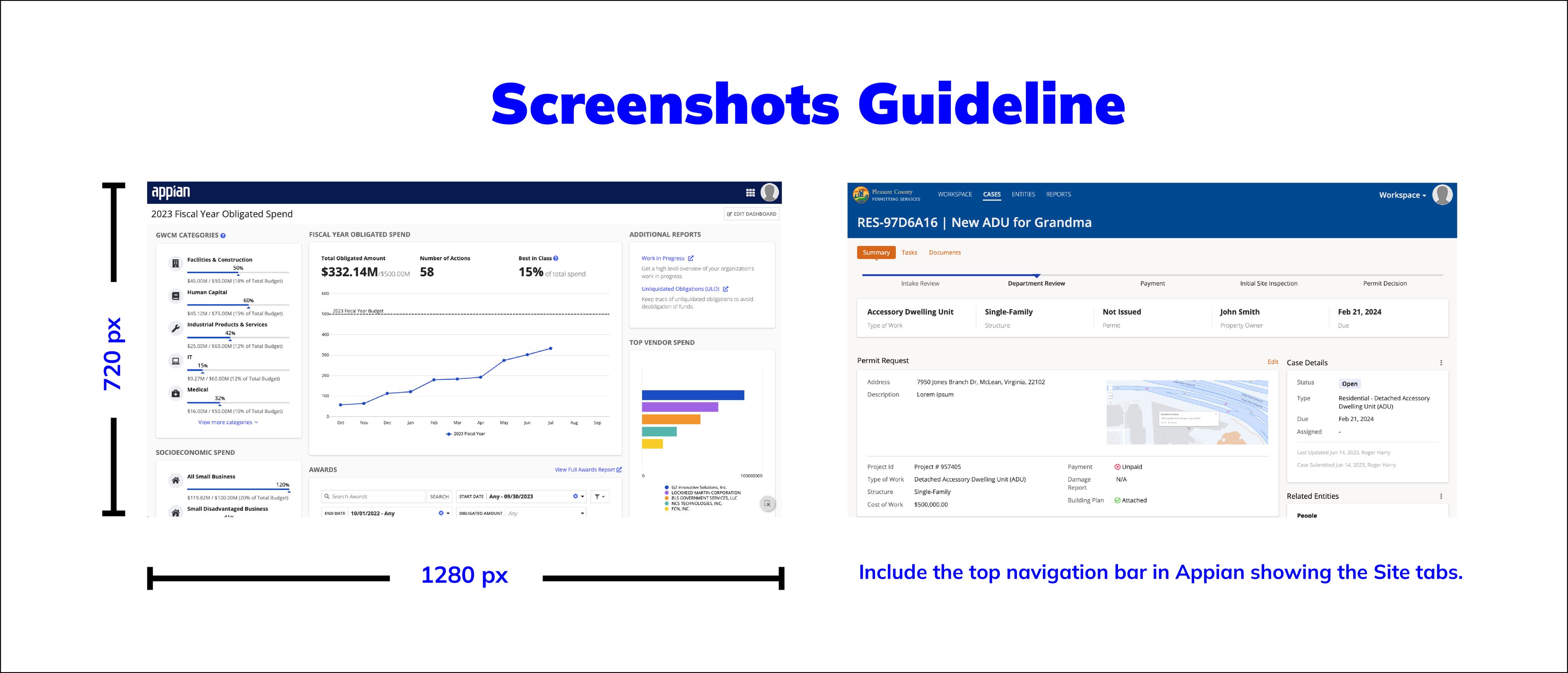
- Include 4 to 8 screenshots to effectively showcase the features and operational capabilities of your listing.
- Tell your app’s story visually! Screenshots should easily “explain” your listing’s purpose and functionality seamlessly.
- Keep it real! Match your sample data with your app’s purpose to help users immediately understand its value. Emphasize relevant configuration options, especially in the case of plugins.
- Include sample data that simulates a real world usage scenario. Do not use test data or any sensitive information (e.g. actual client names).
- Include the top navigation bar in Appian showing the Site tabs.
- For Solutions, Utilities and Component plug-ins ensure the Appian SAIL Design System best practices are followed.
- For best quality, use images with a 16:9 ratio and a minimum size of 1280x720 pixels.
AppMarket Badges
What are AppMarket (Solution) badges?
Badges primarily apply to Solutions and indicate their completeness and maturity. Each badge is earned based on certain criteria:

Award Winner
This solution has won an award by Appian and has been recognized by Appian publicly. This includes winners of our annual AppMarket awards.

Appian Staff Pick
Appian staff pick! Appian likes this listing for the use-case it addresses and/or the functionality it provides.

In Production
This solution is being used in production by Appian customers. Customer references can be available upon request from the author.

Case Management Studio Verified
This solution is verified! It is built on Appian Case Management Studio (CMS) to address a specific use case in a scalable manner.

Cloud Ready
Can be deployed to an Appian Cloud environment and leverage functionality that meets Appian’s Cloud deployment guidelines.

Health Check Reviewed
The listing has had its health check or health dashboard findings reviewed and no major design risks were identified.

Automation Ready with BPM
The listing takes advantage of Appian’s modern business process management platform.

Automation Ready with AI
The listing incorporates AI features to provide insights and outcomes to improve business outcomes.

Automation Ready with IDP
The listing provides Intelligent Document Processing (IDP) capabilities to classify and extract data from documents.

Automation Ready with RPA
The listing leverages Robotic Process Automation (RPA) to provide a unified automation solution.
Developers can extend the Appian platform using plug-ins that can add new functionality to your Appian applications. Plug-ins that are being developed need to adhere to the policies outlined below in order to be deployed to an Appian cloud environment and optionally be shared on the Appian AppMarket and installed via the Admin Console.
AppMarket Plug-in Policies
What are the formal AppMarket submission, review, and usage policies for plug-ins?
- AppMarket Submission Policies for all Plug-ins - including support guidelines and minimum requirements for a plug-in to be eligible for deployment in Appian Cloud environments.
- Component Plug-in Review Process - review process details specifically related to Component Plug-ins.
- Component Plug-in Review Guidelines
Why should I get a pre-approval for my Component Plug-in?
Appian will let you know if what you plan to build is something that might violate our review guidelines. While we can’t guarantee final approval until you submit your completed plug-in, the AppMarket team HIGHLY ENCOURAGES seeking a Component Plug-in pre-approval as the best way to make sure you’re on track before you start.
Why has a plugin been archived on the AppMarket?
Plugins listed on the AppMarket undergo periodic reviews. Upon completion, the AppMarket can make a decision to archive the plugin. If you have any questions, please contact the AppMarket by sending an email to appmarket@appian.com.
Do you have a question or issue about Appian AppMarket that’s not answered here? Would you like to share feedback on the Appian AppMarket? Please email appmarket@appian.com with the details including relevant links, screenshots and a clear description.